
Report example
Monthly flight training report: an example for a solo CFI
See a fictional monthly CFI report example with workload, student momentum, upcoming lessons, privacy boundaries, and a delivery checklist.
Quick orientation
What this guide helps you do
A monthly instructor report should answer where the CFI needs to look next without copying private training detail into email. Voyage delivers on the first at 9 AM Eastern; activity dates use the workspace timezone. Every count should trace back to one workspace and a complete calendar month.
Key takeaways
- Define one workspace, reporting period, and timezone before calculating totals.
- Use the email as a compact index and keep private details behind authentication.
- Separate report generation, delivery, and suppression so failures are operator-visible.
- Never let aggregate logic declare a student safe, current, endorsed, or checkride-ready.
Define the report before counting anything
Set the instructor workspace, reporting start and end, and workspace timezone first. Then count only source records that belong to that boundary. A global operator report is a separate artifact and must never place one instructor's student details in another instructor's digest.
Report definition
- Instructor workspace and intended recipient.
- Reporting period with inclusive start and exclusive end.
- Named workspace timezone used for date boundaries.
- Which booking states count as completed, upcoming, canceled, or unresolved.
- How instructional time is sourced and how incomplete records are handled.
- Links back to the filtered authenticated source view.
Example instructor digest
The following example uses fictional people, totals, lessons, and dates. It demonstrates a privacy-conscious layout, not a recommended workload or evaluation of any student's progress.
Reusable template
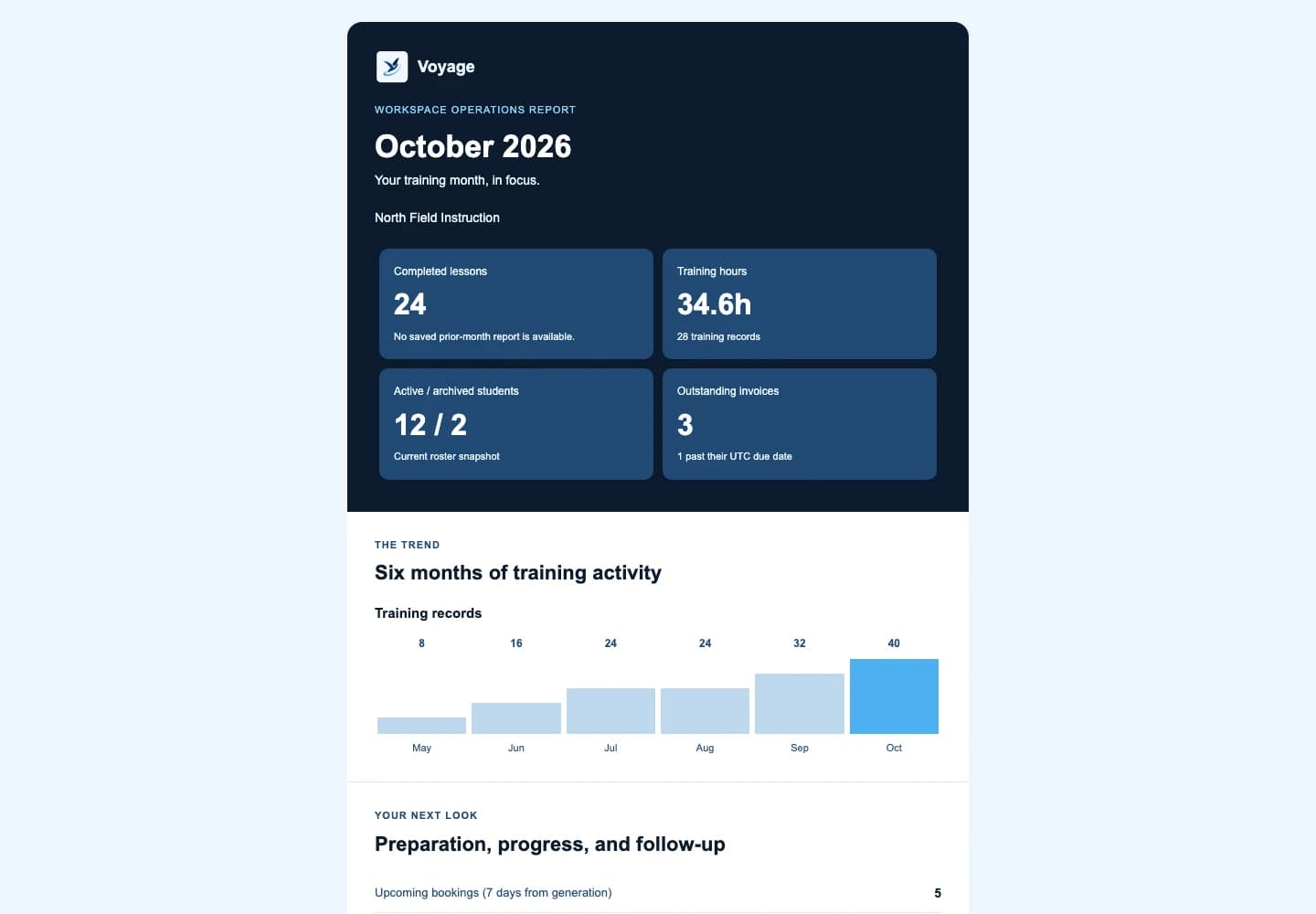
Voyage monthly instructor report — fictional example
Workspace: North Field Instruction · August 2026 · America/New_York
- At a glance
- 24 lessons completed · 34.6 instructional hours recorded · 5 confirmed sessions ahead
- Follow-up
- 2 active students have no future booking · 3 preparation items await review
- Next seven days
- Open the authenticated schedule for confirmed sessions, objectives, and preparation status.
- Records to finish
- 1 completed lesson is missing an instructor debrief; exclude it from progress conclusions until reviewed.
- Administrative attention
- 1 student invoice is outstanding; open the authenticated payment record for status.
- Unavailable data
- Weather context was unavailable for one future session; no conditions were inferred.
Each line should link to the correct authenticated workspace view rather than reproduce private lesson notes in email.
What the digest should leave out
Do not include copies of identity documents, medical information, full payment details, authentication links, private message content, or unrestricted free-text debrief notes. Avoid declaring a student safe, current, endorsed, or checkride-ready based on automated logic.
- Use masked identifiers when an email does not need a full student name.
- Keep timestamps and source-record links for every aggregate.
- Mark unavailable data as unavailable instead of substituting a favorable value.
- Provide report preferences and a clear way to disable nonessential email.
Turn the monthly summary into follow-up
The report is useful only when it points to an action. Work through exceptions first: completed lessons without records, requests awaiting a decision, students without a next objective, preparation due soon, and delivery or data errors that make a count incomplete.
15-minute instructor review
- Finish or correct incomplete lesson records before relying on totals.
- Review requested lessons and either confirm, propose a change, or decline with context.
- Identify students without a future booking and decide whether follow-up is appropriate.
- Review preparation due before the next confirmed sessions.
- Open any payment or document exception only in the authenticated workspace.
- Record regulatory or endorsement actions in their proper authoritative form, not in the digest status.
Make delivery dependable
Create one report per instructor workspace and complete calendar month, then use that key to prevent duplicate sends. Normal delivery is on the first at 9 AM Eastern; daily recovery checks catch up delayed delivery. Record delivery separately from generation and retry temporary provider failures without recounting the same email against quota.
A missed, suppressed, or failed report should appear in operations monitoring. A syntactically invalid or reserved test recipient must never count as delivered, and the CFI should always be able to open the dashboard to see current source records even if email is delayed.
Delivery verification
- One deterministic report key per workspace and reporting period.
- Generation, attempted delivery, delivered, failed, and suppressed are distinct states.
- Retries reuse the same report identity and do not duplicate quota accounting.
- Reserved or malformed recipients are suppressed before any SMTP connection.
- The authenticated dashboard remains the source of truth when email is unavailable.
Worked example: close a month without double counting
A fictional workspace records three completed lessons totaling 4.2 instruction hours in October. A canceled booking is not a fourth completed lesson. Two November bookings belong in upcoming activity, not October's completed totals.
An outstanding student invoice is follow-up work, not received income. Student collections, provider fees, and Voyage subscription charges are separate. Check the source records before treating a summary as an accounting ledger.
Reusable template
Adapt this fictional example
- Completed
- October: 3 completed lessons · 4.2 recorded hours
- Upcoming
- 2 November bookings, separate from completed activity
- Follow-up
- Review the outstanding invoice and each student's next objective in the workspace
Fictional administrative example, not a flight procedure, eligibility assessment, or endorsement.
Primary sources
Check the current official material
Rules, standards, and guidance can change. Open the current source before using this resource for a real training or recordkeeping decision.
Use the workflow in Voyage
Explore Voyage reporting and follow-up
See how monthly reporting connects completed training, upcoming lessons, student follow-up, and authenticated source records.
Explore the product workflowPublished and maintained by Voyage. Read how Voyage researches, updates, and corrects its resources.