
Scheduling guide
A practical scheduling workflow for independent CFIs
Use this flight-lesson scheduling workflow and confirmation checklist to protect instruction time, review student requests, and keep preparation visible.
Quick orientation
What this guide helps you do
A workable CFI calendar separates published availability from approved lessons. Students can request a time, but the instructor confirms only after reviewing aircraft access, lesson purpose, preparation, buffers, and changing operational conditions.
Key takeaways
- Publish only the windows you can realistically teach, including travel and reset buffers.
- Keep requested, confirmed, canceled, and completed lessons visibly distinct.
- Treat calendar weather as supplemental context and complete the applicable preflight process separately.
- Close every completed booking with a training record, debrief, and next action.
1. Set the scheduling rules before opening requests
An independent instructor rarely has a simple open calendar. Aircraft access, daylight, airport operating hours, student availability, maintenance, lesson objectives, and the instructor's own travel time all influence whether a slot is realistic.
Define the repeatable constraints once, then publish only the windows you can genuinely review. Availability tells a student when a request may fit; it is not a promise that the aircraft, conditions, or lesson plan will support that flight.
Availability setup checklist
- Set the instructor workspace timezone and show it beside every request.
- Publish recurring start and end times instead of an all-day 'available' label.
- Add travel, briefing, postflight, and aircraft-reset buffers.
- Block known maintenance, personal, and aircraft-unavailable periods.
- Define common lesson durations while allowing the instructor to adjust a specific request.
- State how much notice students should provide and where cancellation expectations are documented.
2. Use a request-and-approval model
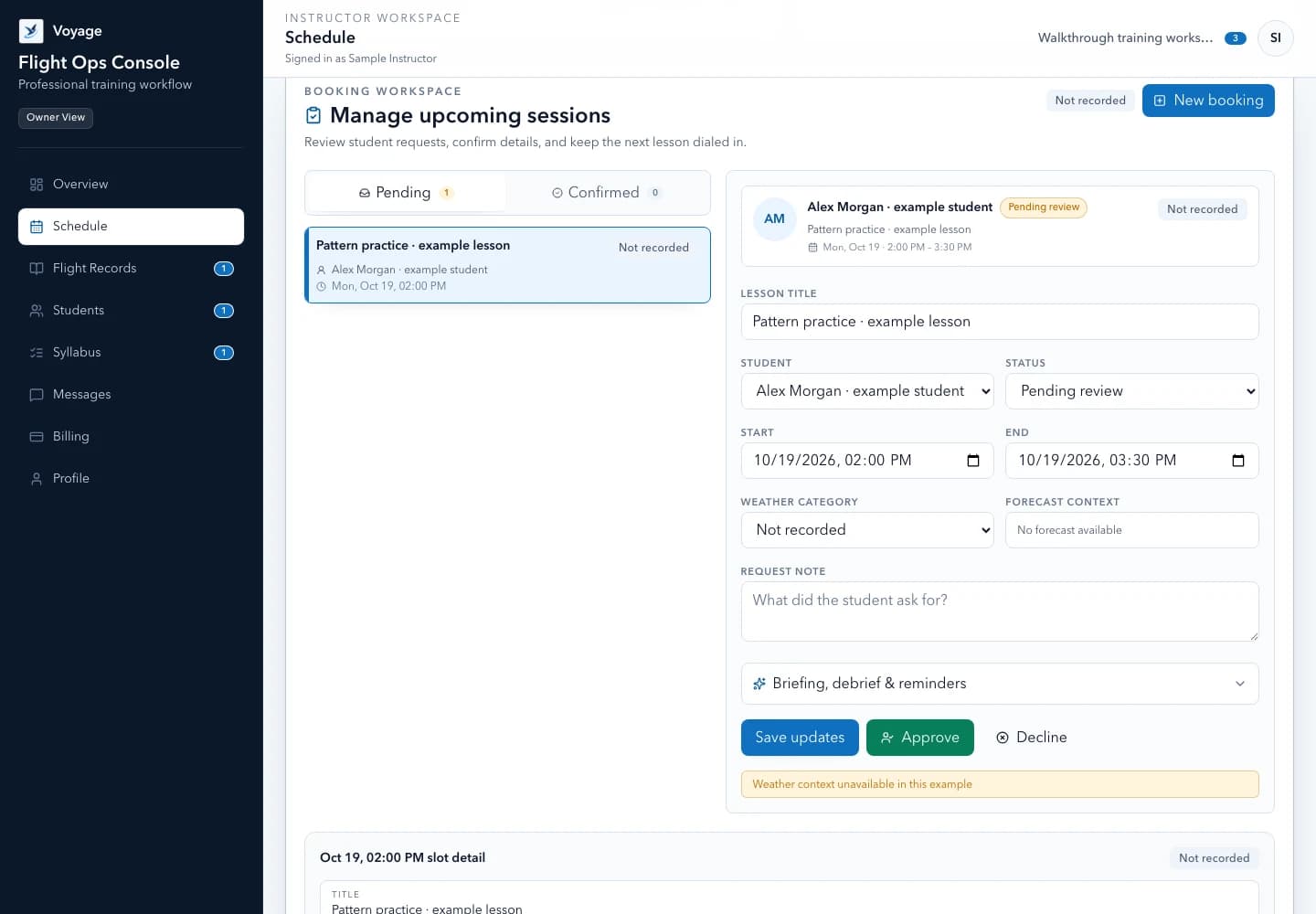
A student request should not become a confirmed flight automatically. Treat the request as a proposal that the CFI checks against aircraft access, lesson sequence, student readiness, and any relevant operational considerations.
Once approved, both people should see the same start time, duration, location, lesson objective, and preparation requirements. When the plan changes, preserve the history instead of silently overwriting it.
- Requested: the student proposes a valid available slot.
- Confirmed: the instructor approves the plan and assigns preparation.
- Canceled or no-show: the reason and notice timing remain visible.
- Completed: the booking connects to the resulting training record and debrief.
3. Run the same confirmation check every time
A short, repeatable review catches the details most likely to create an avoidable conflict. Keep the review attached to the request so the student can see what changed when the instructor confirms a different time or objective.
Reusable template
Copy-ready lesson confirmation checklist
Complete these fields before changing a request to confirmed:
- Time and timezone
- [Date] · [start–end] · [named timezone]
- Location and aircraft
- [Airport/meeting point] · [aircraft or access status]
- Lesson objective
- [Primary objective] · [planned ground/flight emphasis]
- Student preparation
- [Reading, planning, documents, or knowledge check]
- Instructor buffers
- [Briefing/travel/postflight time protected]
- Open constraints
- [Maintenance, daylight, instructor availability, or other unresolved item]
- Decision
- [Confirm as requested / propose change / decline with next option]
Do not place sensitive identity, medical, or payment data in a calendar description.
4. Separate scheduling context from preflight planning
A schedule can show timestamped observations or forecasts as supplemental context, but it should not convert them into an automated go/no-go decision. Conditions change, sources can be delayed, and 14 CFR § 91.103 assigns the applicable preflight responsibility to the pilot in command.
Show the source time and an unavailable state when data cannot be retrieved. The instructor and pilot in command still use current official information and their applicable briefing and decision process; a calendar status never certifies that a flight is safe or legal.
5. Close the loop after the lesson
The most valuable scheduling workflow continues after the calendar event. Convert a completed booking into an explicit lesson record, capture the debrief, and assign the next preparation task while the details are still fresh.
A weekly review can then surface completed hours, upcoming commitments, inactive students, and unresolved follow-up without turning the instructor's inbox into another system to maintain.
Post-lesson closeout
- Mark the booking completed, canceled, or no-show without erasing its prior status history.
- Create the lesson record and record actual instructional time separately from the planned duration.
- Capture observable debrief evidence and the student's reflection.
- Assign one clear next objective and its preparation.
- Record any required entry or endorsement in the appropriate authoritative record outside the scheduling status.
Worked example: review a requested lesson before confirming
Morgan publishes a Tuesday 09:00–11:00 teaching window in America/New_York. Alex requests 09:00–10:30. The request is not a confirmed lesson: Morgan still reviews the objective, preparation, meeting point, and aircraft access.
If the aircraft is unavailable, propose another workable time and update the booking record. Do not leave an old confirmed time in place while relying on a separate message to explain the change.
Reusable template
Adapt this fictional example
- Requested
- Tuesday 09:00–10:30 · America/New_York · awaiting instructor review
- Before confirmation
- Objective, preparation, aircraft access, meeting point, and buffer checked
- Handoff
- Both participants see the same time, location, and booking status; this is not flight authorization
Fictional administrative example, not a flight procedure, eligibility assessment, or endorsement.
Primary sources
Check the current official material
Rules, standards, and guidance can change. Open the current source before using this resource for a real training or recordkeeping decision.
Use the workflow in Voyage
See Voyage scheduling
Set availability, review student requests, attach preparation, and connect completed sessions to the next training record.
Explore the product workflowPublished and maintained by Voyage. Read how Voyage researches, updates, and corrects its resources.